



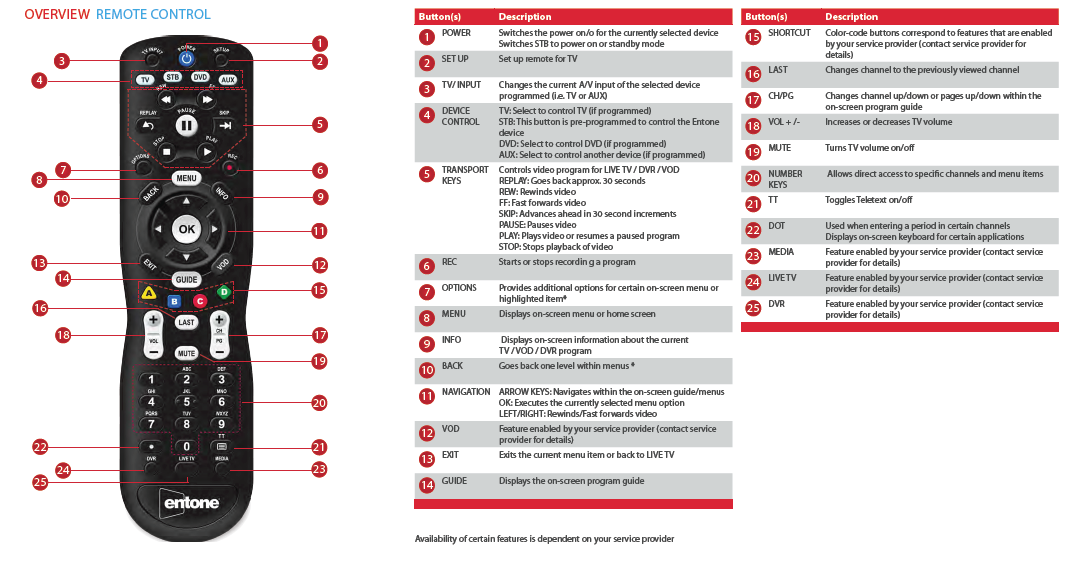
PROGRAM MY STB (Set Top Box) REMOTE TO CONTROL MY TELEVISION
Auto Search Procedures
Try searching for your device code as follows:
1. Turn on your device.
2. On the remote control, press the corresponding Device
Control key (TV / STB / DVD / AUX) to choose the device
mode.
3. Press and hold “SETUP” key until the LED blinks twice.
4. Press number keys “9” – “9” – “1”.
5. Press “Power” key.
6. Press “CH +” key repeatedly until your device turns off.
7. Press and hold “SETUP” key until LED blinks twice to save
the working code.